PROBLEM: ACER TOUCHPAD NOT WORKING
This is a funny story. I have today upgraded Vista through Microsoft Upgrade. However, the required restart didn't work. I had to turn the laptop off as it was stuck in the "Logging Off" screen.
Everything turned out fine after restart, except -- The Synaptics TouchPad did not work. Neither the Pad to move the mouse pointer, nor the Left and Right Buttons.
Luckily I had the external Microsoft wireless mouse attached. The USB wireless mouse worked, so I was not impaired.
Tried rebooting to no avail. Looked for the new driver on manufacturer's website, uninstalled, installed again (it was the same version anyways), no change. Touchpad is still not working!
A quick search on the web revealed what the solution is:
SOLUTION FOR "ACER TOUCHPAD NOT WORKING" SOUGHT
It turns out that, while trying to restart laptop after the software upgrade, I was pushing various buttons that I knew not what they were for. In the top row of the keyboard. Such as turn off screen, the ZZZ button that put laptop to sleep (but after coming back still ended in the "logging off" mode). etc. One of the infamous buttons was the Fn-F7. That one's pic has something that looks like a hand over a square - the Touchpad. It's an on-off switch for the Touchpad! Who knew! I played with this only as the computer was shutting down. I did not need touchpad at that time to find out it was disabled. Funny.
SOLUTION FOR "ACER TOUCHPAD NOT WORKING" FOUND
So press Fn-F7 and your touchpad is back. Simple as that.
WHAT ABOUT YOU?
Did you have a similar problem? Where is the touchpad on/off button on your laptop? Leave me a comment, would you? Thanks!
Showing posts with label netbook case. Show all posts
Showing posts with label netbook case. Show all posts


4 Fashionable Ways to Protect Your Laptop in Style
BEING MOBILE
Today's business professionals, students, even work-at-home professionals do not like to be tied to a single location. They need and want to be mobile. They like to enjoy working from the airports, Starbucks locations, libraries, or hotels. Laptops, and more recently, netbooks are a preferred way for them to be able to accomplish serious amount of work anywhere, anytime.
YOUR LAPTOP UNDER STRESS
The movements, shifts, vibrations, even accidental drops are expected to cause substantial stress on laptops and netbooks. The part most exposed to such stress is the hard disk. Hard disks are virtually the only moving part in netbooks and laptops. Hard disks are very sensitive to shocks, vibration, even loud shouting!
HIGH TEMPERATURE?
High operating temperature is another major reason for laptop and netbook hardware troubles. Especially when the computer is exposed to direct sunshine and when operating at high processor utilization. Such as having many programs running at the same time.
FOUR WAYS TO STAY MOBILE AND PROTECTED IN STYLE
As a mobile professional you do not want to compromise your mobility. You can, however, minimize the risk of computer damage. Here are three ways to do that:


Laptop sleeve. These are relatively thin enclosures and should tightly fit your laptop or netbook. They are made of leather or neoprene. Some netbooks these days come with a sleeve. If not, that is a worthy extra expense. You do want to be stylish here. Depending on your style, you can pick up a single color skin, like black, or you can go with an artsy, colorful skin. Go all out, protect your computer in style!

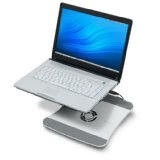 Laptop chill pad. A chill pad will protect your laptop or netbook from high temperature. High operating temperature can damage both your hard disk, the CPU, and the motherboard. Computer problems caused by overheating are difficult to diagnose and expensive to fix.
RELATED LINKS
A gallery of laptop and netbook skins

A gallery of laptop and netbook sleeves
Laptop bags and cases
Top three laptop chill pads
Is Windows 7 a worthy upgrade for your laptop?
Subscribe to:
Posts (Atom)
